Garbage disposal humming but not spinning: the 1/4 inch wrench, the red reset button and the one case that means a new unit
InSinkErator's fix: switch off, 1/4 inch Allen wrench in the bottom socket until it turns freely, cool up to 20 minutes, then press the red reset button.
- Verified
- Updated
- 7 min read
- 6 sources
Shop links on this page are affiliate links: a purchase may earn us a commission at no extra cost to you. Disclosure
Short answer
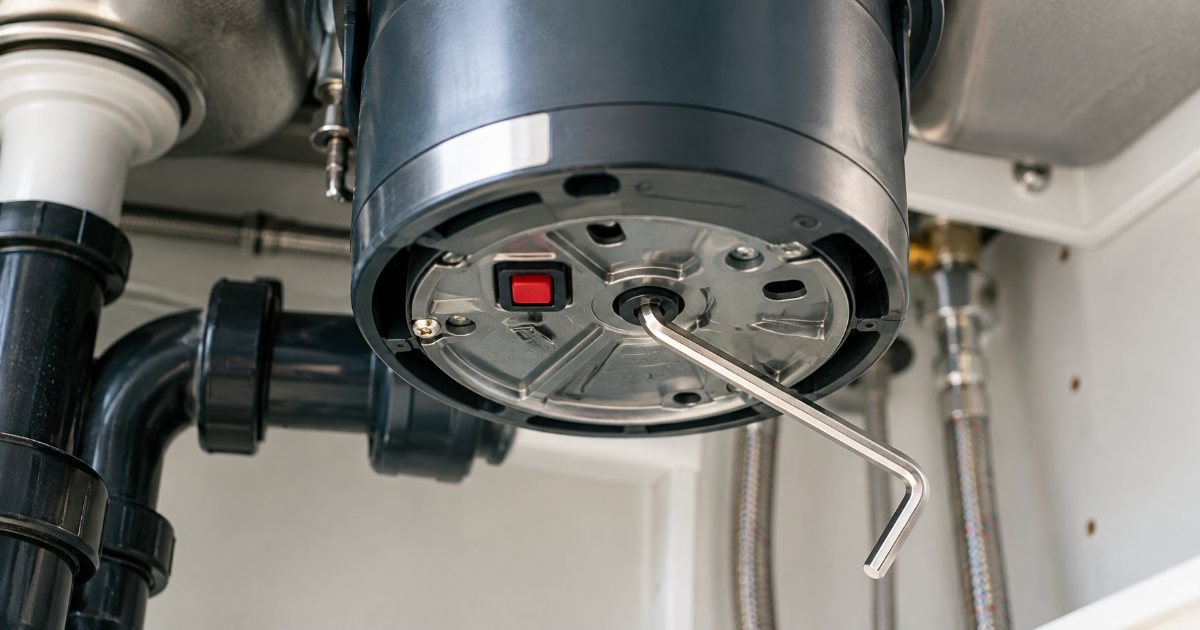
A garbage disposal that hums but does not spin is jammed, and InSinkErator’s own jam page gives humming, stuck and stopped units the same procedure. Turn the wall switch off. Put a standard 1/4 inch Allen wrench (or the four-inch silver crank wrench that shipped with the unit) into the socket on the bottom of the disposal, dead center, facing the floor, and work it back and forth until it turns freely in complete circles in both directions. Let the motor cool for up to 20 minutes. Then find the small square red overload button on the same underside: when tripped it drops about a quarter of an inch (5 mm). Press it gently; if it will not stay up, wait ten minutes and try again. Run cold water and switch on. A silent disposal is a power problem, not a jam: breaker, switch, then the reset button. A running disposal with standing water is a clogged drain line, not the motor.
The picks
The silver wrench that came with the disposal is gone
InSinkErator WRN-00 Jam-Buster Wrench
InSinkErator's own jam wrench; the maker's jam page says a standard 1/4 inch Allen wrench does the same job
Before you price a new disposal, spend two minutes under the sink with a 1/4 inch Allen wrench: the humming unit is the one most likely to be fine.
What does the sound tell you?
The sound narrows it to one of three procedures, and InSinkErator publishes a separate support page for each. Read the table before touching anything, then turn the switch off.
| What you hear | What it means | InSinkErator’s procedure |
|---|---|---|
| Humming, no spin | The motor is powered but the grinding plate cannot turn: a jam | Switch off, 1/4 inch Allen wrench in the bottom socket, back and forth until it turns full circles both ways, cool up to 20 minutes, press the red reset button |
| Nothing at all | No power reaching the motor, or the overload protector has tripped | Breaker off and on, test the outlet and switch with another device, then check whether the red button has dropped |
| Runs, sink drains slowly or not at all | The drain line past the disposal is clogged; the motor is not the fault | Whirlpool test, then a plunger with four inches (10 cm) of water in the sink |
| Ran, then stopped mid-grind and now hums or is silent | Jam that has tripped the overload protector | Wrench first, then cool-down, then the reset button |
The overload protector is the thermal cut-out that stops the motor when it stalls or overheats; on an InSinkErator it is the red button, and the reset page says the switch must be off before it is pressed.
Two safety lines come straight from the jam page and apply to every row: make certain the switch is in the off position, and do not place your hand in the garbage disposal at any time.
If the silver wrench is gone, the InSinkErator WRN-00 Jam-Buster wrench is the maker’s replacement. It is not a special tool: InSinkErator’s page says a standard 1/4 inch Allen key from a hex set does the same job.
What do the numbers mean?
Every figure on this page is InSinkErator’s, from its support pages, read on 27 September 2026. Other makers such as Waste King and Moen publish their own steps in the manual shipped with the unit; their support pages did not open for this article, so none of their numbers appear here. If the unit under your sink is not an InSinkErator, the sequence is the same shape (switch off, free the jam, cool, reset) and the manual gives the specifics.
| Figure | What it is | Source page |
|---|---|---|
| 1/4 inch | Allen wrench that fits the bottom socket; the included wrench is about four inches long | Fixing a Jammed Garbage Disposal |
| Up to 20 minutes | Cool-down after a jam before turning the unit back on; for push-button air-switch units, unplugged for the same period | Fixing a Jammed Garbage Disposal; Resetting a Garbage Disposal |
| About 1/4 inch (5 mm) | How far the red button drops when the overload has tripped | Resetting a Garbage Disposal |
| Ten minutes | Wait before pressing the reset button again if it will not stay up | Resetting a Garbage Disposal |
| Four inches (10 cm) | Water in the sink before plunging a clogged disposal | Fixing a Clogged Garbage Disposal |
| 1–3, 4–7, 8–10 years | Limited warranty ranges for the Standard, Power and Quiet Series | InSinkErator FAQ |
The 20 minute cool-down matters more than it looks: the reset button on a hot motor may not stay up, which is what the ten minute retry in the reset instructions is for. Pressing it repeatedly without the wait tells you nothing.
The warranty ranges are the FAQ’s general figures by series. InSinkErator’s warranty page sends the owner to the Installation, Care and Use manual for the term that applies to a specific model, so check the manual before assuming a number.
When is it not a jam?
A completely silent unit is the electrical path, and InSinkErator’s won’t-turn-on page works outward from the panel:
- Check the circuit breaker or fuse; to be certain, switch the breaker off then on, or replace the fuse.
- Plug-in unit: unplug the disposal, plug another device into the outlet, and flip the disposal switch on and off several times. The device should follow the switch.
- If it does not, the page says to contact an electrician for the outlet.
- Hardwired unit: if the breaker is fine and it still does not run, the page says the problem may be in the disposal or in the electrical system. That is a licensed electrician’s call, not a wrench job.
- In either case, check whether the red reset button has popped out, and reset it per the table above.
A unit that runs is not a motor problem, whatever the sink is doing. InSinkErator’s clogged-disposal page has you turn the disposer on and look for a whirlpool: if you see one, you may have a clogged drain line. Its fix is the plunger with four inches (10 cm) of water, pressed down slowly and pulled up quickly, several times.
Before you buy anything
Do the wrench, the cool-down and the reset once, in that order, with the switch off. If the plate turns freely, the button stays up and the unit grinds with cold water running, you are done and the new disposal you were pricing stays in the shop. If the button drops again on the next grind, or the wrench frees a jam that comes straight back, the motor or the grind chamber is the problem and none of InSinkErator’s support pages resolve that: that reader belongs on the best garbage disposal page.
When does it mean a new unit?
InSinkErator’s jam, reset, clog and won’t-turn-on pages fix a stuck plate, a tripped overload, a bad outlet and a blocked drain. They do not address a unit that leaks from the bottom of the housing, and no maker page readable for this article stated a cause or a repair for that. What follows is general appliance reasoning, not a maker citation: a leak from the housing rather than from the sink flange or a hose connection is a failed seal or body, and a household disposal is not serviceable at that point.
| What you find | Read it as | Next page |
|---|---|---|
| Wrench frees it, reset holds, grinds normally | Jam, fixed | None; keep fats, oils and fibrous scraps out per InSinkErator’s FAQ |
| Reset button drops again on the next use | Overload tripping repeatedly; the pages give no further step | Best garbage disposal |
| Water dripping from the bottom of the housing, not the flange or a hose | Housing or seal failure, not covered by the troubleshooting pages | InSinkErator disposal model cross-reference for the like-for-like replacement |
| Under warranty by series and model manual | A support call before a purchase | InSinkErator support, 800-558-5700 |
The cross-reference page matters because a same-family replacement drops onto the existing mounting assembly, and the model number on the label decides which family that is.
What should you do first?
- Turn the wall switch off, or unplug a push-button unit, before anything else.
- Listen: hum means the wrench, silence means the breaker, a running motor means the drain.
- For a hum, work the 1/4 inch Allen wrench in the bottom socket until it turns full circles both ways.
- Wait up to 20 minutes, press the red button, and wait ten more if it will not stay up.
- Run a moderate flow of cold water, switch on, and keep the water running a few seconds after grinding stops.
- If the button drops again or the housing leaks, stop: that is a replacement, not a repeat.
Frequently asked questions
What size Allen wrench does a garbage disposal take?
InSinkErator's jam page says a standard 1/4 inch Allen wrench, or the silver crank-shaped wrench about four inches long that ships with the unit. The socket is on the bottom of the disposal, dead center, facing the floor. Work the wrench back and forth in both directions until it turns freely in complete circles both ways, with the wall switch off.
Where is the reset button on a garbage disposal and how long do I wait?
InSinkErator's reset page puts the overload protector on the bottom of the disposal, facing the floor: a small square red button. When it has tripped, the button sits about a quarter of an inch (5 mm) lower than normal. Gently press it. If it does not stay up, wait ten minutes and try again. The switch must be off before you press it.
My disposal makes no sound at all. Is the motor dead?
Not necessarily. InSinkErator's won't-turn-on page starts at the circuit breaker or fuse: switch the breaker off and on. For a plug-in unit, unplug it and plug a lamp into the outlet, then flip the disposal switch; if the lamp does not follow the switch, the page says to contact an electrician. Then check whether the red reset button has popped out.
The disposal runs but the sink drains slowly. Is the motor failing?
No. InSinkErator's clogged-disposal page uses a whirlpool test: turn the disposer on, and if you see a whirlpool in the water, you may have a clogged drain line rather than a disposal problem. Its fix is a plunger: fill the sink with four inches (10 cm) of water, press down slowly over the opening, pull up quickly, and repeat several times.
What should never go down a garbage disposal?
InSinkErator's FAQ says to avoid fats, oils, harsh cleaning products and other non-food products in any model. For its Standard Series it also names stringy and fibrous materials such as banana peel, celery and rhubarb. Those are the maker's lists; the unit's own care and use manual is the one that applies to a specific model and its warranty.
Fact sheet and how to cite this page
- Answer
- A disposal that hums without spinning is jammed, not dead. InSinkErator’s jam page: switch off, work a 1/4 inch Allen wrench in the socket on the bottom of the unit until it turns full circles both ways, cool up to 20 minutes, then press the square red reset button, which drops about a quarter inch (5 mm) when tripped. If it will not stay up, wait 10 minutes and retry.
- Basis
- InSinkErator’s own support pages for a jammed disposal, the overload reset button, a clogged disposal and a disposal that will not turn on, which together give the wrench size, the socket location, the cool-down and reset wait times, the 4 inch (10 cm) plunging depth and the electrical checks.
- Assumptions
- A continuous-feed household disposal with a bottom hex socket and a red overload button, which is the InSinkErator layout. Other makers publish their own procedure in the manual shipped with the unit; none of their numbers are quoted here because their pages were not readable for this article.
- The wall switch is off before any wrench or button is touched, and no hand goes into the grinding chamber at any point, both per InSinkErator’s instruction.
- A unit that leaks from the bottom housing or trips the overload repeatedly is outside what these support pages resolve; that reader is sent to the replacement pages, not to a second wrench attempt.
- Method
- Four InSinkErator support pages read on 27 September 2026 and reduced to one decision table keyed on the sound the unit makes: humming, silent, running with standing water. The Standard, Power and Quiet Series warranty ranges and the list of what to keep out of the unit come from the InSinkErator FAQ page. No Waste King or Moen page could be opened, so no figure is attributed to either.
- Primary source
- InSinkErator, Fixing a Jammed Garbage Disposal (manufacturer or vendor document)
- Facts verified
- Last updated
- Cite as
- OwnerSpec, "Garbage disposal humming but not spinning: the 1/4 inch wrench, the red reset button and the one case that means a new unit", https://ownerspec.com/plumbing/guides/garbage-disposal-humming-not-spinning-reset/, facts verified 27 September 2026.
Every figure above also appears, with its source, in the article. All sources · How OwnerSpec verifies numbers
Sources
- InSinkErator, Fixing a Jammed Garbage Disposal (manufacturer or vendor document)
- InSinkErator, Resetting a Garbage Disposal (manufacturer or vendor document)
- InSinkErator, Fixing a Clogged Garbage Disposal (manufacturer or vendor document)
- InSinkErator, Garbage Disposal Won't Turn On or Off (manufacturer or vendor document)
- InSinkErator, Frequently Asked Questions (manufacturer or vendor document)
- InSinkErator, Support (manufacturer or vendor document)